The AI Employee Starter Kit
Everyone says you should have an AI working for you. This kit shows you what your real options are, what one looks like when it's working, and how to give your first one a job.
- →An honest map of your options, from the assistant you already pay for to building your own. What each one is good at and where it breaks.
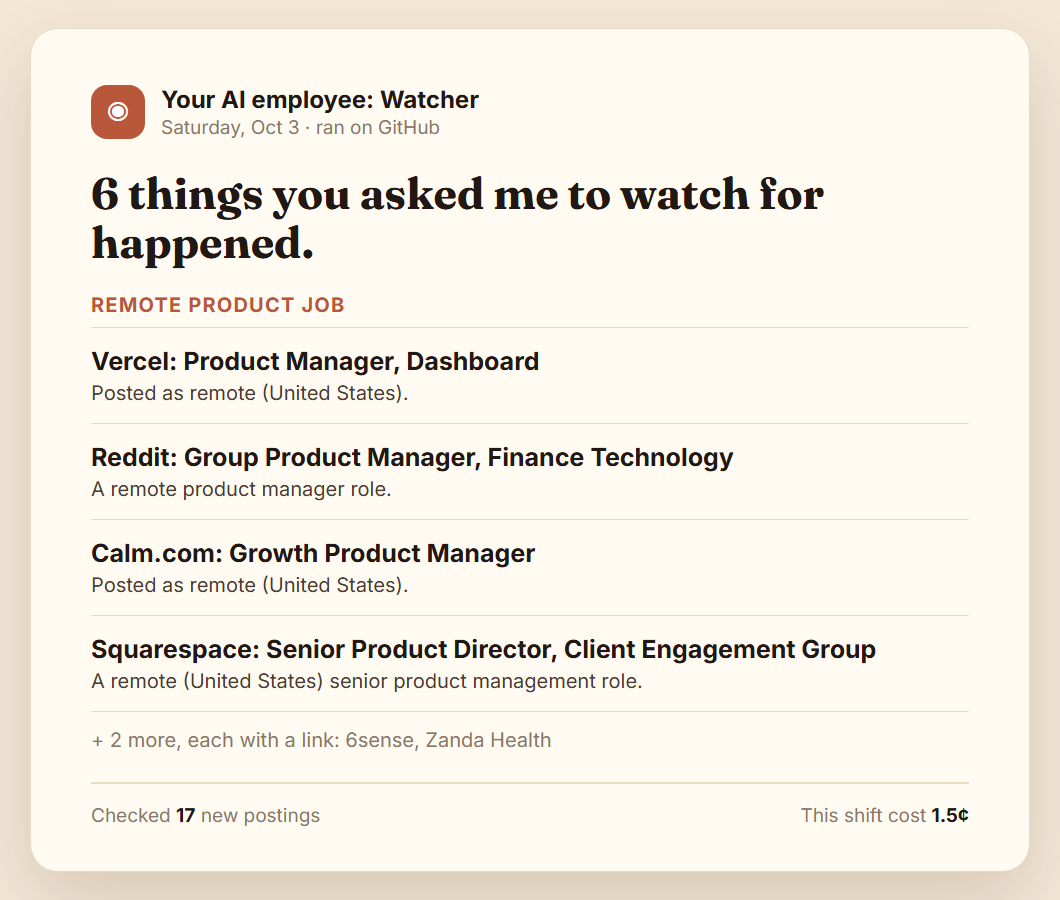
- →Real output from a working AI employee: a job-hunt alert and a weekly review, straight from a test run.
- →A template to write your first watch, with four filled-in examples you can copy tonight.
Get the weekly Build Log
Every week: what I built, what broke, and the real numbers on the road from zero to a million. Your first email has a link back to this kit, so it's in your inbox when you need it, and over your first week you'll get a few short emails on where I'd start.
Free. Unsubscribe anytime. No spam, just the real journey.
1. The honest map of your options
"AI employee" means five different things right now. Each of these is a good choice for somebody. Find yours in one line, then read the detail below.
Find yours:
| If you want | Start with |
|---|---|
| A daily summary | The assistant you already pay for |
| AI that acts across your apps | Zapier, Make, or n8n |
| A powerful agent you'll host and secure | OpenClaw or Hermes Agent |
| A few pages watched, zero setup | A page watcher like Visualping |
| One message only when your thing happens | A custom employee you own |
Here's what each one does well, where it breaks, and who it fits.
Chat assistants with scheduled tasks
ChatGPT, Claude, Gemini
- Good at
- A daily summary with almost no setup. ChatGPT's scheduled tasks are free now (three tasks, once a day). Claude Pro can run scheduled tasks in the cloud. Gemini's Daily Brief, on paid plans, builds one from your Gmail and calendar.
- Where it breaks
- They send you something every run, whether anything happened or not. You pick from their features, not your own sources. And the feature can go away: OpenAI retired its Pulse morning brief in June 2026, nine months after launch.
- Fits
- You want a morning summary and already pay for one of them.
No-code automations
Zapier, Make, n8n
- Good at
- Connecting the apps you already use and taking actions between them: when this happens, do that. Low setup, hosted for you.
- Where it breaks
- Hosted plans meter what you use (Zapier counts activities, and one AI run can use many), so a busy month can run out early. A hosted service also holds broad permissions to your apps.
- Fits
- You want AI to do things across your apps and you're already using one of these tools.
Open-source agent frameworks
OpenClaw, Hermes Agent (from Nous Research)
- Good at
- Power. Free and open source, general-purpose agents that can run commands, message you from chat apps, and act for you. Far more capable than anything else on this list.
- Where it breaks
- You need a server or an always-on machine, several installs, and a gateway running around the clock. Because they can act, the risk is bigger: in early 2026, more than 135,000 OpenClaw setups were found open on the internet, and hundreds of malicious add-ons turned up in its skill marketplace.
- Fits
- Tinkerers who are happy to host it and lock it down themselves.
Hosted AI employees and page watchers
Visualping for page changes, Lindy for inbox and meetings
- Good at
- Signing up and going. Visualping watches web pages for changes and has a free plan (150 checks a month across 5 pages). Services like Lindy handle email and meetings for a team.
- Where it breaks
- A monthly fee once you outgrow a free tier (Lindy has none; its plans start at $29.99 a month). A page watcher sees that a page changed, but it doesn't check your own condition across a mix of sources ("a remote PM job at an AI company, not crypto"). And the vendor holds your history.
- Fits
- You want to watch a handful of pages, or you're a team that wants inbox help without building anything.
A custom AI employee you own
A small program in your own account that runs on a schedule
- Good at
- Staying quiet until your exact condition is met, across any feeds and pages you choose. Your files, any model, a spending cap you set, running while your laptop is closed.
- Where it breaks
- Setup friction: a GitHub account and an API key. It can't read your private inbox or calendar. Free schedulers often run a few hours late. And you're the one who owns it when something needs fixing.
- Fits
- You're waiting on something specific and you'd rather own a small thing you understand than rent a big thing you don't.
Checked October 2026. Prices, free tiers and features change, so check the current plan before you sign up.
2. When custom wins (and when it doesn't)
Building or buying your own employee is worth the setup when you need one of these:
- →Watching for something specific. One message the day the right job is posted or the price drops. Every other day, silence.
- →Owning your data and memory. The prompts, history, and outputs are files in your account, not a task list in someone's app.
- →Any model. Cheap for simple alerts, the best one for writing that needs judgment. Switch whenever you want.
- →A hard spending cap. A limit checked before every model call, so cost is a number you set, not a surprise.
- →Running unattended. On a schedule, laptop closed, nothing for you to host.
- →Nobody can retire it on you. A product you rent can be retired or changed overnight. A file you own stays the way you left it.
When it doesn't win: if all you want is a daily summary, use the built-in assistants. They do it well, with no setup. Same if you need it to read your private inbox or calendar, or to act for you: reply, book, buy. A read-only custom employee won't do those, on purpose.
3. See one working
Here's a real AI employee doing its job. Both of these came from my test run on October 3, 2026, in a private test repo. The Watcher ran on GitHub's free scheduler. Nothing staged.
The Watcher: a job hunt. The watch was called "Remote product job." It checked a job board's feed and sent this.
The Weekly Review: my own week. It read the plain notes file I kept, checked it against my goals, and wrote this. An excerpt:
What happened against your goals
Launch this week: done. You finished the last two employees, got the store approved, ran a test purchase that worked, and put the sales page live on Saturday. That was the biggest goal of the week and you hit it.
Reach out before building each day: missed. Building took over five of six days.
Not cheerleading. It told me the truth about my week, in plain words, from the notes file I kept that week, gaps and all.
4. Write your first watch
A watch has two parts: what to tell you about, in plain English, and where to look. That's all. You can use this with any tool that watches for you, or keep it ready for when you set one up.
Watch name: a short label
Tell me when: the thing you're waiting for, said like you'd say it to a person
Ignore: what doesn't count, and the noise on the page
Where to look:
- feed: a link to an RSS feed (job boards, blogs, news sites)
- page: any web page, checked for what changed since last time
Feed or page? A feed is a list of new posts that most job boards, news sites, and blogs publish, so each check sees only what's new. A page is any web page: the watcher keeps a snapshot and compares it each time (the first check is just the starting point). Pages that need JavaScript to show their content usually can't be read, so try a feed first.
The job hunt
Tell me when a product manager job is posted that's remote or in my city, pays $120K or more, and is full-time.
Ignore crypto companies and contract roles.
feedWe Work Remotely, product jobs: https://weworkremotely.com/categories/remote-product-jobs.rss
The price drop
Tell me when the price of the [thing you want] on this page goes under $[your number].
Ignore shipping banners, "only a few left" messages, and recommended products.
pageThe product page itself
The apartment
Tell me when a new 2-bedroom listing appears in [your neighborhood] under $[your rent] a month.
Ignore listings outside the neighborhood and anything over budget.
pageYour saved search on a listings site, or a local listings feed if it has one
The competitor's pricing page
Tell me when [competitor] changes a price, or adds or removes a plan.
Ignore cookie banners, visitor counters, and rotating testimonials.
pageTheir pricing page
Tips that make a watch work:
- →Write it like you'd say it to a person. "A remote PM job at an AI company" beats a list of keywords. The AI reads it the way a person would.
- →Always say what to ignore. Banners and counters change every day, and near misses you'd never act on just waste your attention.
- →One watch, one thing. Two separate watches beat one that tries to cover everything.
- →Expect some sites to say no. In my test run, one pricing page refused the check. A good watcher tells you "could not check" instead of going quiet.
Using a chat assistant's scheduled task instead? Paste the same lines in. It will still reply every time it runs, but your condition and your ignore list will make those replies a lot sharper.
Want your watch running tonight, with your laptop closed?
Your First AI Employee is the one you saw above: a Watcher, a Weekly Review, and a Morning Brief from the sources you pick. It lives in a private repo in your own GitHub and runs free on GitHub's scheduler. A five-minute interview writes your watches for you.
- →Any model through one OpenRouter key, about $0.06 to $2.30 a month in model costs, paid to OpenRouter directly.
- →Spending caps checked before every model call. Read-only: it never posts, buys, or replies.
- →One-time purchase, no subscription. You own it, and you can build more employees on it. Email me within 14 days for a full refund if it's not for you.
Secure checkout through Polar. Your GitHub repo invite arrives right after you pay.
Rather have one built for your exact job? Book a fit call.
Running a business and want a whole team of AI employees, with the database and dashboards, installed with you 1-on-1? That's The Marketing System Install.
There's enough out here for everyone. Go hire your first employee. Nate